

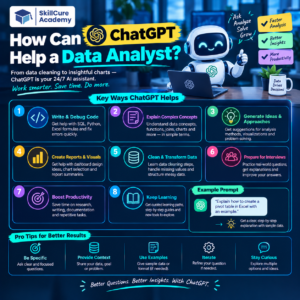

Data Analysts work with data every day to find patterns, solve business problems, create reports, and communicate insights. But many tasks can take significant time, especially when working with SQL, Excel, Python, or Power BI.
This is where ChatGPT can help a Data Analyst. It can act as an AI assistant for brainstorming, writing queries, explaining concepts, checking code, preparing reports, and improving productivity.
However, ChatGPT should not replace analytical thinking. A Data Analyst still needs to understand the business problem, validate the results, and make the final decisions.
1. Understanding Business Problems
Before analyzing data, an analyst needs to understand what the business actually wants to know.
ChatGPT can help convert a general business question into specific analytical questions.
For example:
Business Problem: “Our sales are decreasing.”
ChatGPT can help an analyst break this into questions such as:
- Which products have declining sales?
- Which regions are experiencing the biggest drop?
- Has the number of customers decreased?
- Has the average order value changed?
- Are sales declining during a particular month?
- Which customer segments are affected?
This makes the analysis more structured.
2. Writing SQL Queries
SQL is one of the most important skills for Data Analysts. ChatGPT can help create SQL queries based on a business requirement.
For example, an analyst can ask:
“Find the top 5 products by revenue in each region.”
ChatGPT can help generate a query using concepts such as:
- SELECT
- WHERE
- GROUP BY
- JOIN
- CTEs
- Window Functions
- ORDER BY
- CASE statements
The analyst should still verify the query against the actual database structure and business rules.
3. Explaining SQL Errors
Sometimes a SQL query doesn’t work because of a syntax error, incorrect column name, or logical mistake.
Instead of spending a long time trying to understand the problem, an analyst can provide the query and error message to ChatGPT.
ChatGPT can explain:
| Problem | How ChatGPT Can Help |
|---|---|
| Syntax error | Explain the incorrect SQL syntax |
| Wrong column | Identify possible column-name issues |
| JOIN problem | Explain matching and duplicate records |
| Incorrect result | Review the query logic |
| Slow query | Suggest optimization approaches |
This can be particularly useful while learning SQL.
4. Working With Excel
Data Analysts frequently use Excel for data cleaning, calculations, reporting, and analysis.
ChatGPT can help create or explain formulas such as:
- XLOOKUP
- VLOOKUP
- INDEX-MATCH
- IF
- SUMIFS
- COUNTIFS
- TEXT functions
- Date functions
- Conditional formulas
For example:
“Write an Excel formula to identify duplicate customer IDs.”
ChatGPT can provide a formula and explain how it works.
It can also suggest ways to clean messy data, split columns, remove duplicates, and structure datasets.
5. Helping With Python
Python is widely used for data analysis, especially when working with larger datasets or repetitive tasks.
ChatGPT can help Data Analysts with Python libraries such as:
- Pandas
- NumPy
- Matplotlib
- Seaborn
For example, an analyst might ask:
“Write Python code to find missing values in every column of a dataset.”
ChatGPT can provide code and explain each step.
This makes it useful for both beginners and experienced analysts who want to speed up repetitive coding tasks.
6. Data Cleaning
Data cleaning can consume a large amount of an analyst’s time.
Typical problems include:
- Missing values
- Duplicate records
- Incorrect data types
- Spelling inconsistencies
- Outliers
- Invalid dates
- Extra spaces
- Inconsistent categories
ChatGPT can help create a data-cleaning checklist and suggest approaches for handling these problems.
For example:
| Data Problem | Possible Approach |
|---|---|
| Missing values | Replace, remove, or investigate |
| Duplicate rows | Identify and remove duplicates |
| Extra spaces | Apply text-cleaning functions |
| Wrong data type | Convert to the appropriate type |
| Inconsistent categories | Standardize values |
| Invalid dates | Convert and validate date formats |
The important point is that the analyst should decide how the data should be cleaned based on the business context.
7. Finding Insights From Data
ChatGPT can help analysts think about what questions to ask when exploring a dataset.
For example, for an e-commerce dataset, an analyst could investigate:
- Monthly revenue trends
- Best-selling products
- Customer retention
- Average order value
- Regional performance
- Repeat customers
- Cancellation rates
ChatGPT can also help create an initial list of potential insights to investigate.
The actual conclusions should be based on the data and validated calculations—not assumptions generated by AI.
8. Creating Data Visualization Ideas
Choosing the right chart is important when communicating insights.
ChatGPT can suggest suitable visualizations based on the analytical question.
| Analytical Question | Possible Chart |
|---|---|
| How are sales changing over time? | Line Chart |
| Which category has the highest sales? | Bar Chart |
| How are sales distributed? | Histogram |
| How do two variables relate? | Scatter Plot |
| How does performance compare? | Bar Chart |
| How is a total divided into components? | Stacked Bar Chart |
The final chart should depend on the audience, data, and message being communicated.
9. Power BI Assistance
ChatGPT can also support analysts working with Power BI.
It can help explain or generate examples for:
- DAX formulas
- Calculated columns
- Measures
- Data modeling concepts
- KPI ideas
- Dashboard layouts
- Visualization selection
For example:
“Create a DAX measure to calculate year-over-year sales growth.”
ChatGPT can provide a starting point and explain the formula.
The analyst should test the measure using the actual Power BI model because relationships and filter context can affect the result.
10. Automating Repetitive Tasks
Data Analysts often perform repetitive activities such as:
- Formatting reports
- Cleaning data
- Creating formulas
- Writing similar SQL queries
- Preparing documentation
- Generating summaries
ChatGPT can help create scripts, formulas, or workflows that reduce repetitive work.
This allows analysts to spend more time on business analysis and decision-making.
11. Preparing Data Analyst Interview Questions
ChatGPT can also be used for interview preparation.
An analyst can ask it to generate questions related to:
- SQL
- Excel
- Python
- Power BI
- Statistics
- Data cleaning
- Business cases
- Scenario-based questions
It can also simulate an interview by asking questions one at a time and providing feedback on the responses.
This can help candidates practice explaining their analytical thinking instead of simply memorizing answers.
12. Improving Communication Skills
A Data Analyst needs to communicate findings to managers, clients, and other teams.
ChatGPT can help turn technical analysis into simple business language.
For example:
Technical statement:
“Revenue decreased by 18% in Q3 due to a decline in repeat purchases.”
This can be communicated to a business audience as:
“Q3 revenue fell mainly because fewer existing customers made repeat purchases.”
The goal is not simply to make the sentence shorter. It is to make the insight easier for the intended audience to understand.
ChatGPT vs Data Analyst
ChatGPT can assist with many analytical tasks, but it does not eliminate the need for a Data Analyst.
| Data Analyst | ChatGPT |
|---|---|
| Understands business context | Helps structure the problem |
| Validates data | Can suggest validation approaches |
| Makes analytical decisions | Provides possible approaches |
| Interprets business impact | Helps explain findings |
| Checks accuracy | Can review calculations/code |
| Communicates with stakeholders | Helps prepare communication |
| Takes responsibility for conclusions | Generates supporting content |
The analyst remains responsible for validating the work and making sure the conclusions are supported by reliable data.
Best Practices When Using ChatGPT for Data Analytics
To get better results from ChatGPT, Data Analysts should:
- Give clear instructions.
- Explain the business context.
- Mention the database or tool being used.
- Provide relevant column names and data types.
- Share error messages when troubleshooting.
- Ask for explanations instead of blindly copying code.
- Test SQL, Python, Excel formulas, and DAX before using them.
- Validate AI-generated insights against the actual dataset.
- Avoid sharing confidential or sensitive business information.
Final Takeaway
ChatGPT can be a useful productivity tool for Data Analysts. It can help with SQL, Excel, Python, Power BI, data cleaning, visualization ideas, documentation, interview preparation, and communication.
The biggest advantage is not simply generating code faster. It is helping analysts explore problems, learn faster, automate repetitive tasks, and communicate their findings more clearly.
But effective Data Analysts still need strong fundamentals. Business understanding, analytical thinking, data validation, and critical thinking remain essential.
Think of ChatGPT as an AI assistant for a Data Analyst—not a replacement for the analyst.
FAQs
1. Can ChatGPT replace a Data Analyst?
No. ChatGPT can assist with many Data Analyst tasks, but analysts still need to understand business requirements, validate data, interpret results, and communicate decisions.
2. Can ChatGPT write SQL queries?
Yes. ChatGPT can create, explain, debug, and optimize SQL queries when given sufficient context. The query should always be tested against the actual database.
3. Can ChatGPT help with Excel?
Yes. It can help create and explain Excel formulas, clean data, identify duplicates, troubleshoot formulas, and suggest analysis techniques.
4. Can ChatGPT help with Power BI?
Yes. ChatGPT can help with DAX, dashboard ideas, data modeling concepts, and visualization suggestions. Generated formulas should be tested within the actual Power BI model.
5. Is ChatGPT useful for beginner Data Analysts?
Yes. Beginners can use it to learn SQL, Excel, Python, Power BI, and analytical concepts. However, they should focus on understanding the logic rather than simply copying AI-generated answers.