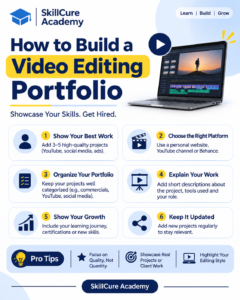

Video editing is one of the most valuable creative skills in today’s digital world. From YouTube videos and Instagram Reels to advertisements, corporate videos, and films, businesses and content creators need skilled video editors to produce engaging content.
However, learning video editing software is not enough to get hired. You also need to demonstrate your editing skills through a professional portfolio.
If you are a beginner wondering how to build a video editing portfolio without professional experience, this guide will help you get started. You will learn what to include, which projects to create, where to showcase your work, and how to make your portfolio attractive to potential clients and employers.
1. Understand What a Video Editing Portfolio Is
A video editing portfolio is a collection of your best video editing projects that demonstrates your creativity, technical knowledge, storytelling ability, and editing style.
It helps potential employers and clients understand what you can do before hiring you.
A good portfolio should demonstrate your ability to:
- Edit raw footage into professional videos.
- Create engaging Instagram Reels and YouTube Shorts.
- Add transitions, effects, and animations.
- Work with background music and sound effects.
- Perform colour correction and colour grading.
- Create professional titles and subtitles.
- Tell stories through video editing.
Your portfolio acts as your practical introduction to the industry.
2. Learn Video Editing Software
Before building your portfolio, you should become comfortable with at least one professional video editing tool.
You do not need to master every editing software available. Start with one tool and gradually expand your knowledge.
Here are some popular video editing tools:
| Software | Best For |
|---|---|
| Adobe Premiere Pro | Professional video editing |
| DaVinci Resolve | Video editing and colour grading |
| Filmora | Beginners and content creators |
| CapCut | Reels, Shorts, and social media videos |
| Final Cut Pro | Professional Mac-based video editing |
Focus on learning essential editing techniques such as cutting, trimming, transitions, audio editing, colour correction, and exporting.
Once you understand these fundamentals, start creating projects for your portfolio.
3. Create Different Types of Video Editing Projects
One of the biggest mistakes beginners make is adding only one type of video to their portfolio.
Different clients have different requirements. Some need social media videos, while others need advertisements, promotional videos, or YouTube content.
Try to create projects across multiple categories.
Here are some portfolio project ideas:
1. YouTube Video Editing
Create a 3–5 minute YouTube video with proper cuts, background music, subtitles, transitions, and engaging visuals.
2. Instagram Reels and YouTube Shorts
Create short-form videos with attractive captions, sound effects, quick transitions, and engaging storytelling.
3. Promotional Videos
Design a promotional video for a product, brand, institute, or small business.
4. Cinematic Video Editing
Create a cinematic travel video using colour grading, background music, slow-motion effects, and smooth transitions.
5. Corporate Videos
Edit a professional business introduction or company presentation video.
6. Advertisement Videos
Create a short advertisement showcasing a product or service.
Try to include at least 5–8 quality projects rather than uploading dozens of average videos.
4. Build Projects Even If You Have No Experience
Many beginners believe they cannot build a portfolio because they have never worked with a company or client.
This is not true.
You can create professional-looking portfolio projects without having any previous work experience.
Here are some ways to get started:
- Use Free Stock Footage: Download royalty-free footage from websites such as Pexels and Pixabay.
- Create Sample Advertisements: Choose a product and create a 15–30 second advertisement.
- Edit Personal Videos: Use your own travel videos, event recordings, or everyday footage.
- Create Social Media Content: Make sample Reels and Shorts for imaginary brands.
- Offer Free Sample Work: Work on small projects for friends, local businesses, or creators to gain experience.
Remember, sample projects are perfectly acceptable in a beginner’s portfolio. Just identify them as self-initiated or practice projects rather than paid client work.
5. Create an Attractive Video Editing Showreel
A showreel is a short video that highlights your best editing work.
It is often the first thing a potential employer or client watches.
Instead of making someone watch all your projects individually, a showreel gives them a quick overview of your capabilities.
Follow these tips to create an effective showreel:
- Keep it around 45–90 seconds.
- Start with your strongest editing work.
- Include different editing styles.
- Use suitable background music.
- Demonstrate transitions, colour grading, and motion graphics.
- Avoid unnecessary effects.
- End with your name and contact information.
Your showreel should focus on quality, creativity, and storytelling rather than simply showing off editing effects.
6. Choose the Right Platform to Showcase Your Portfolio
After completing your projects, the next step is to publish them somewhere potential employers and clients can easily access.
You do not necessarily need an expensive website to showcase your work.
Several free and professional platforms can help you build an online presence.
| Platform | How It Helps |
|---|---|
| Behance | Showcase creative and video editing projects |
| YouTube | Upload complete editing projects and showreels |
| Vimeo | Present professional-quality videos |
| Display short-form editing work | |
| Personal Website | Create a professional portfolio with all your projects |
| Connect with recruiters and potential clients |
For beginners, combining YouTube, Instagram, and Behance can be a practical starting point.
Make sure your portfolio links work properly and your videos are accessible without unnecessary restrictions.
7. Add Important Details to Your Portfolio
A professional portfolio should not contain videos alone. It should also provide information about your skills and the tools you use.
Include the following sections:
About Me: Write a short introduction explaining who you are and your interest in video editing.
Skills: Mention your editing skills, such as video cutting, colour grading, motion graphics, audio editing, and storytelling.
Software Knowledge: List the tools you know, such as Adobe Premiere Pro, DaVinci Resolve, and After Effects.
Projects: Add your best video editing samples with short descriptions.
Showreel: Place your best work at the beginning of your portfolio.
Contact Information: Include your professional email address and LinkedIn profile.
These details help employers understand your capabilities and make it easier for them to contact you.
8. Optimise Your Portfolio for Job Opportunities
Building a portfolio is only the first step. You also need to make it visible to potential employers.
Here are some practical ways to improve your chances of getting video editing opportunities:
- Add your portfolio link to your resume.
- Share your editing projects regularly on LinkedIn.
- Upload short editing samples to Instagram.
- Connect with YouTubers, influencers, and digital marketing agencies.
- Apply for internships and freelance projects.
- Customise your portfolio according to the job requirements.
- Keep adding new projects as your skills improve.
You can also create different portfolio versions for different roles, such as social media video editor, YouTube video editor, and advertisement video editor.
9. Common Mistakes to Avoid When Building a Video Editing Portfolio
A portfolio should highlight your strongest abilities. Avoid these common mistakes:
| Common Mistake | What You Should Do Instead |
|---|---|
| Uploading too many videos | Select your best 5–8 projects |
| Using too many effects | Focus on clean and professional editing |
| Ignoring audio quality | Maintain clear audio and balanced sound |
| Showing only one editing style | Include different project categories |
| Not providing contact details | Add professional contact information |
| Using low-quality footage | Choose clear and high-resolution footage |
| Not updating your portfolio | Regularly add your latest work |
Remember that a clean and well-organised portfolio can create a stronger impression than a large collection of unorganised videos.
10. How Long Does It Take to Build a Video Editing Portfolio?
The time required depends on your current skills, learning speed, and the number of projects you want to create.
Here is an example of a four-week portfolio-building plan for beginners.
| Week | Activities |
|---|---|
| Week 1 | Learn editing basics and software tools |
| Week 2 | Create YouTube videos and Instagram Reels |
| Week 3 | Create advertisements and cinematic videos |
| Week 4 | Prepare a showreel and publish your portfolio |
If you practise consistently, you can create a beginner-level portfolio within a month.
However, continue improving your projects as you gain experience and learn advanced editing techniques.
Conclusion
Building a video editing portfolio is an important step towards starting a career in video editing. You do not need professional experience or expensive equipment to get started. What matters most is your creativity, practical knowledge, and ability to demonstrate your skills through real projects.
Start with basic editing projects, experiment with different styles, create an impressive showreel, and showcase your work on professional platforms.
If you want to develop industry-relevant video editing skills, consider joining a practical video editing course in Noida where you can learn professional editing software, work on creative projects, and build a portfolio that demonstrates your abilities.
At Skillcure Academy, practical learning and project-based training can help beginners take their first steps towards a career in the creative industry.
Frequently Asked Questions (FAQs)
1. How do I create a video editing portfolio as a beginner?
Start by learning video editing software and creating 5–8 sample projects. Include YouTube videos, Instagram Reels, promotional videos, and advertisements. Upload your best work to platforms such as Behance, YouTube, or a personal website.
2. Do I need professional experience to build a video editing portfolio?
No. Beginners can create sample projects using royalty-free footage, personal recordings, and practice assignments. A portfolio should demonstrate your editing abilities, not just your professional experience.
3. Which software is best for creating a video editing portfolio?
Adobe Premiere Pro and DaVinci Resolve are popular professional editing tools. Beginners can also start with Filmora or CapCut, depending on their requirements.
4. How many videos should a video editing portfolio contain?
A beginner’s portfolio should ideally contain 5–8 high-quality projects. Focus on showcasing different editing styles instead of uploading too many similar videos.
5. Where can I showcase my video editing portfolio?
You can showcase your work on Behance, YouTube, Vimeo, Instagram, LinkedIn, or your personal website. Sharing your portfolio across these platforms can help you reach potential employers and clients.