
Artificial Intelligence is changing the way Data Analysts work. Tasks that once took hours, such as writing SQL queries, creating Excel formulas, analyzing datasets, preparing reports, and finding patterns, can now be completed much faster with AI tools.
For Data Analysts, AI is not necessarily a replacement for analytical skills. Instead, it can work as an assistant that helps with repetitive tasks, speeds up analysis, and makes it easier to understand complex data.
In 2026, learning how to use AI along with Excel, SQL, Power BI, and Python can be a valuable skill for anyone preparing for a Data Analyst career.
Why Should Data Analysts Learn AI Tools?
A Data Analyst works with large amounts of information every day. AI can help reduce the time spent on repetitive work and allow analysts to focus more on business problems and decision-making.
AI tools can help analysts:
- Generate and explain SQL queries
- Create Excel formulas
- Clean and summarize datasets
- Identify patterns and trends
- Generate Python code
- Create charts and visualizations
- Summarize reports
- Explain technical concepts in simple language
- Find possible errors in analysis
- Prepare insights for presentations
However, analysts should always verify AI-generated results before using them in business decisions.
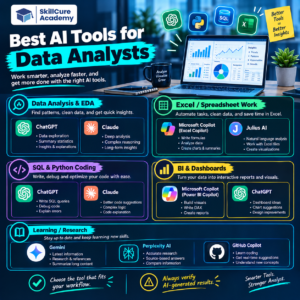
Best AI Tools for Data Analysts
There are many AI tools available today, but each tool is useful for different types of analytical work.
| AI Tool | Best For | Common Data Analyst Use |
|---|---|---|
| ChatGPT | SQL, Python & general analysis | Queries, formulas, data analysis and explanations |
| Microsoft Copilot | Excel & Microsoft tools | Formulas, summaries and data exploration |
| Power BI Copilot | BI & dashboards | DAX, report summaries and insights |
| Claude | Analysis & documentation | Data reasoning, coding and report writing |
| Gemini | Google ecosystem | Sheets, analysis and research |
| Julius AI | No-code analysis | Dataset analysis and visualization |
| Tableau AI | Visualization | Insights and natural-language analysis |
| Hex | SQL & Python workflows | Notebooks, analysis and collaboration |
1. ChatGPT.
ChatGPT can be useful across almost every stage of a Data Analyst’s workflow.
A Data Analyst can upload supported datasets and ask questions about the data, generate SQL queries, create Python code, explain formulas, or brainstorm ways to analyze a business problem.
For example, instead of manually writing a complex SQL query, an analyst can describe the business requirement and ask AI to create a query.
It can also explain the query line by line, which makes it useful for people who are still learning SQL.
Common uses of ChatGPT
- SQL query generation
- Python assistance
- Excel formula creation
- Data cleaning ideas
- Dataset exploration
- Insight generation
- Interview preparation
- Report and documentation support
The important skill is not simply knowing how to ask AI for an answer. You should also understand how to check whether the answer is correct.
2. Microsoft Copilot
Microsoft Copilot can be particularly useful for professionals who work extensively with Microsoft products.
For Data Analysts, Excel is one of the most important applications where AI assistance can save time.
Copilot can help with tasks such as understanding data, generating formulas, summarizing information, and exploring trends.
Example
Suppose you have monthly sales data for several products.
Instead of manually calculating every trend, you can use AI assistance to explore questions such as:
- Which product generated the highest sales?
- Which month had the lowest revenue?
- Which region is growing fastest?
- Are there unusual changes in sales?
The analyst should still verify the calculations and understand the underlying dataset.
3. Power BI Copilot
Power BI is widely used for business intelligence and dashboard creation.
AI features in the Power BI ecosystem can assist analysts with tasks such as generating report summaries, working with DAX, and exploring data.
This can be especially helpful when building dashboards for business users.
For example, a sales dashboard may contain revenue, profit, customers, products, and regional performance.
AI assistance can help summarize the major patterns so that stakeholders can understand the dashboard more quickly.
Useful areas include:
- DAX assistance
- Report summaries
- Data exploration
- Dashboard-related insights
- Natural-language interaction
But an analyst still needs to understand data relationships, measures, filters, and business definitions.
4. Claude
Claude is another AI assistant that can support Data Analysts with coding, reasoning, documentation, and data-related tasks.
Analysts can use it to understand SQL queries, generate Python code, review analysis approaches, or create documentation.
It can also be useful when working with long pieces of technical information that need to be summarized or explained.
5. Gemini
Gemini can be useful for people working within Google’s ecosystem.
Data professionals who use Google Sheets and other Google Workspace products can use AI assistance for productivity and analytical workflows.
For example, an analyst working with a large spreadsheet can use AI to help understand the data, generate ideas for analysis, or assist with formulas.
6. Julius AI
Julius AI focuses heavily on data analysis and allows users to interact with datasets using natural language.
A user can provide a dataset and ask questions about it without manually writing every piece of code.
For example:
“Show me the monthly sales trend and identify the months with the highest revenue.”
The tool can help turn such questions into analysis and visualizations.
This makes tools like Julius AI interesting for users who are learning data analysis or want to explore datasets more quickly.
7. Tableau AI
Tableau is a popular data visualization and business intelligence platform.
Its AI capabilities can assist users in exploring data and generating insights through more natural interactions.
For Data Analysts, the combination of visualization skills and AI can make dashboard development and data exploration more efficient.
However, understanding visualization principles remains important. AI cannot automatically know which business metric is most important unless the analyst provides the right context.
8. Hex
Hex combines data analysis workflows involving SQL, Python, notebooks, visualization, and collaboration.
It can be useful for analysts who work on more advanced analytical projects where SQL and Python are used together.
AI assistance can help analysts move from a business question to exploratory analysis and documentation more efficiently.
How AI Tools Help in Different Data Analyst Tasks
Different AI tools are useful at different stages of the analytics process.
| Data Analyst Task | AI Can Help With |
|---|---|
| Data Cleaning | Finding missing values, duplicates and inconsistencies |
| Excel | Formulas, summaries and data exploration |
| SQL | Query generation, debugging and explanation |
| Python | Code generation and debugging |
| Power BI | DAX, summaries and dashboard assistance |
| Visualization | Chart suggestions and explanations |
| Reporting | Summarizing findings |
| Documentation | Explaining analysis and methodology |
| Interview Preparation | Practice questions and project explanations |
AI Tools Do Not Replace Core Data Analyst Skills
One common mistake is thinking that learning AI tools means you no longer need to learn SQL, Excel, Power BI, or Python.
That is not the right approach.
Imagine that AI generates an SQL query for you. If you don’t understand SQL, you may not notice that the query is using the wrong JOIN or calculating the wrong metric.
Similarly, AI may suggest a chart that technically works but does not communicate the business insight clearly.
Therefore, Data Analysts should build strong fundamentals first.
Core skills to learn
- Excel
- SQL
- Power BI or Tableau
- Python
- Statistics
- Data visualization
- Business understanding
- Communication
- Problem-solving
Then use AI to improve speed and productivity.
How to Use AI as a Data Analyst
A good AI workflow can look like this:
Step 1: Understand the business problem
First identify what the business actually wants to know.
Step 2: Understand the data
Check columns, data types, missing values, duplicates, and relationships.
Step 3: Use AI for assistance
Ask AI to suggest SQL queries, formulas, Python code, analysis methods, or visualization options.
Step 4: Validate the output
Check calculations, logic, filters, joins, assumptions, and business definitions.
Step 5: Generate insights
Turn the validated results into meaningful business insights.
Step 6: Communicate the findings
Present the results through a dashboard, report, presentation, or concise explanation.
This approach keeps the analyst in control while using AI to save time.
Example: Using AI to Analyze Sales Data
Suppose a company gives you a sales dataset containing:
- Order Date
- Product
- Region
- Customer
- Sales
- Profit
You could ask an AI assistant:
“Analyze this dataset and identify the top-performing products, regions with declining sales, and months with unusual changes.”
AI may help you generate the SQL or Python needed for the analysis.
But you should then check the calculations yourself.
Finally, you could create a Power BI dashboard showing:
- Total Sales
- Total Profit
- Sales by Region
- Sales by Product
- Monthly Sales Trend
- Profit Margin
The result is a workflow where AI assists with the technical work while the Data Analyst remains responsible for the analysis and business interpretation.
What Should a Beginner Learn First?
If you are starting your Data Analyst journey, don’t try to learn every AI tool at once.
A simple learning path can be:
Excel → SQL → Power BI → Python → AI-assisted analytics
Once you understand the fundamentals, experiment with AI tools to improve your workflow.
For example, after learning SQL, start using AI to:
- Generate practice questions
- Create business problems
- Explain errors
- Optimize queries
- Review your solutions
This gives you both analytical knowledge and AI productivity skills.
Final Thoughts
AI is becoming an important part of the modern Data Analyst workflow. Tools such as ChatGPT, Microsoft Copilot, Power BI Copilot, Claude, Gemini, Julius AI, Tableau AI, and Hex can help analysts work faster and explore data more efficiently.
But AI should be treated as an assistant rather than an automatic source of truth.
The strongest approach is to combine data fundamentals + business understanding + AI skills.
If you are preparing for a Data Analyst career in 2026, focus on learning Excel, SQL, Power BI, Python, and statistics first. Then learn how AI can make each of these skills more productive.
FAQs
1. What is the best AI tool for Data Analysts?
There is no single tool for every task. ChatGPT can support SQL, Python and general analysis, while tools such as Power BI Copilot, Microsoft Copilot, Julius AI, Tableau AI and Hex are useful for specific analytical workflows.
2. Can AI replace Data Analysts?
AI can automate or accelerate many repetitive analytical tasks, but Data Analysts still need to understand business requirements, validate results, interpret data, and communicate insights.
3. Should I learn SQL if AI can write SQL queries?
Yes. Understanding SQL is important because you need to verify AI-generated queries and understand whether they correctly answer the business question.
4. Can beginners use AI tools for data analysis?
Yes. Beginners can use AI to learn concepts, practice SQL and Python, understand errors, explore datasets, and receive explanations. However, they should learn the fundamentals instead of depending completely on AI-generated answers.
5. Which skills should a Data Analyst learn in 2026?
Important skills include Excel, SQL, Power BI or Tableau, Python, statistics, data visualization, business understanding, communication, and the ability to use AI tools effectively.