
Data Analytics is changing rapidly, and Artificial Intelligence is becoming an important part of the modern Data Analyst’s workflow. In 2026, analysts are expected to work with traditional tools such as Excel, SQL, Python, Power BI, and Tableau while also using AI to automate repetitive tasks, explore datasets, generate code, and communicate insights.
AI tools for Data Analysts can reduce the time required for data cleaning, exploratory analysis, visualization, reporting, and documentation. However, these tools do not eliminate the need for analytical thinking. A Data Analyst still needs to understand business requirements, validate results, identify errors, and make meaningful decisions from data.
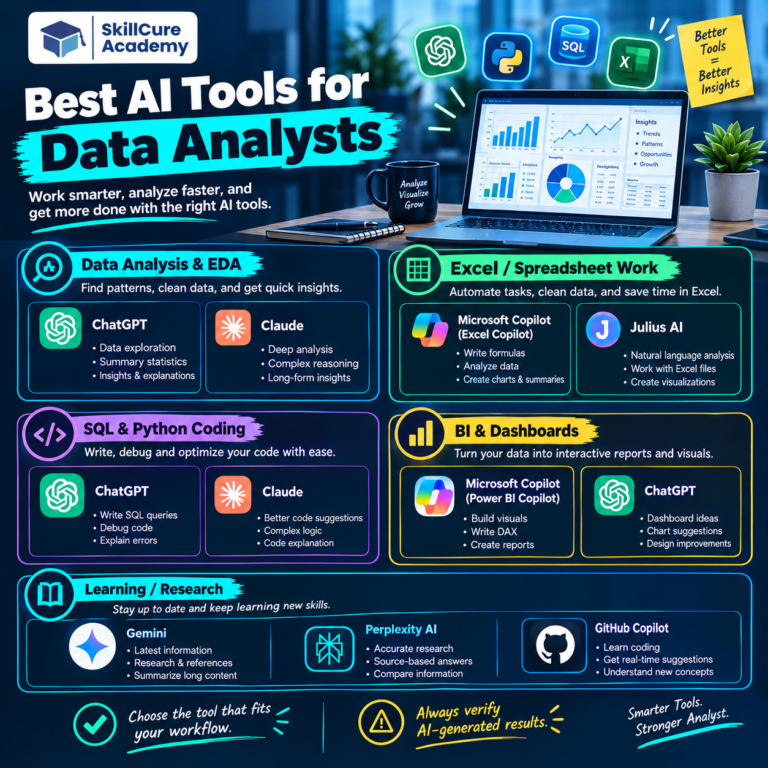
Recent 2026 comparisons highlight tools such as ChatGPT, Claude, Julius AI, Microsoft Copilot, Power BI Copilot, Tableau AI, GitHub Copilot, Gemini, Hex, and ThoughtSpot for different stages of the analytics workflow.
If you want to build a future-ready career in Data Analytics, learning how to combine AI with core analytical skills can give you a significant advantage.
Why Should Data Analysts Learn AI Tools in 2026?
Traditional data analysis can involve several repetitive tasks, including cleaning datasets, writing formulas, preparing SQL queries, creating charts, checking trends, and preparing reports.
AI can assist with many of these activities and allow analysts to spend more time on interpretation and decision-making.
Some important benefits include:
- Faster data exploration.
- Automated assistance with data cleaning.
- Faster SQL and Python code generation.
- Natural-language interaction with datasets.
- Automated insights and summaries.
- Faster dashboard development.
- Assistance with formulas and calculations.
- Improved reporting and documentation.
- Better productivity for repetitive analytical tasks.
However, AI-generated results should always be checked before being used for business decisions. AI can generate incorrect calculations, misunderstand business context, or produce code that requires modification.
Top 10 AI Tools Every Data Analyst Should Learn in 2026
1. ChatGPT
ChatGPT has become one of the most flexible AI assistants for Data Analysts.
With appropriate data-analysis capabilities, analysts can upload spreadsheets or CSV files, explore datasets, generate Python code, create visualizations, identify trends, and explain analytical results in simple language.
It can also help analysts write and debug SQL queries, Excel formulas, Python scripts, and documentation.
What Data Analysts Can Use It For
- Exploring Excel and CSV datasets.
- Generating Python and SQL code.
- Explaining statistical concepts.
- Finding potential data-quality issues.
- Creating charts and summaries.
- Brainstorming analytical approaches.
- Documenting analytical workflows.
ChatGPT is particularly useful as a general-purpose AI assistant because it can support multiple stages of the analytics process.
2. Microsoft Copilot
Microsoft Copilot is especially useful for analysts working extensively with the Microsoft ecosystem.
Copilot can assist with tasks across applications such as Excel and can help users work with formulas, summaries, and data-related questions using natural language.
For analysts who already use Microsoft 365, learning how to integrate Copilot into their workflow can reduce repetitive work.
Useful Applications
- Excel formula assistance.
- Data summaries.
- Trend identification.
- Spreadsheet analysis.
- Report and document preparation.
- Natural-language assistance.
The biggest advantage is that analysts can use AI without completely changing their existing Microsoft-based workflow.
3. Microsoft Power BI Copilot
Power BI remains one of the most important business intelligence platforms for Data Analysts, and its AI capabilities make it even more useful.
Power BI Copilot can assist with report creation, DAX-related tasks, summaries, and natural-language interactions with analytical content.
Instead of manually starting every analytical task from scratch, analysts can use natural-language instructions to accelerate parts of the dashboard development process.
Power BI Copilot Can Help With
- Generating report content.
- Creating summaries.
- Assisting with DAX.
- Explaining insights.
- Working with report data.
- Generating natural-language narratives.
However, understanding Power BI data modeling, relationships, DAX, and visualization principles is still essential. AI works best when the analyst understands the underlying data model.
4. Claude
Claude is another powerful AI assistant that can support Data Analysts with complex analytical tasks.
It can help with SQL, Python, documentation, reasoning through analytical problems, and interpreting large amounts of information.
For analysts working with detailed requirements or large pieces of documentation, long-context AI capabilities can be particularly useful.
Common Use Cases
- SQL query generation.
- Python assistance.
- Data interpretation.
- Documentation.
- Code review.
- Analytical brainstorming.
- Explaining technical concepts.
Claude can be particularly valuable when an analyst needs to work through a complex problem rather than simply generate a quick answer.
5. Julius AI
Julius AI is designed specifically around conversational data analysis.
It allows users to interact with datasets using natural language, making it useful for analysts and beginners who want to explore data without writing every piece of code manually.
For example, an analyst can ask questions about sales performance, trends, outliers, or customer behavior and use the resulting analysis as a starting point for deeper investigation.
Julius AI Can Help With
- Dataset exploration.
- Statistical analysis.
- Data visualization.
- Trend identification.
- Asking questions in natural language.
- Exploring spreadsheets and datasets.
It is especially useful for conversational exploratory data analysis.
6. Tableau AI
Tableau is widely used for data visualization and business intelligence, and its AI capabilities are making dashboard interaction more conversational.
Tableau’s AI features can help users explore data, discover insights, and interact with visualizations using natural-language approaches.
For Data Analysts working with Tableau, learning its AI-powered capabilities can improve the speed of dashboard exploration and insight generation.
Key Applications
- Natural-language data exploration.
- Automated insights.
- Visualization assistance.
- Dashboard analysis.
- Trend discovery.
- Data storytelling.
AI can make dashboards more accessible, but analysts still need strong visualization skills to determine which insights are actually relevant to the business.
7. GitHub Copilot
GitHub Copilot is particularly useful for Data Analysts who work with Python, SQL, notebooks, or other programming environments.
Instead of writing every line of code manually, analysts can describe what they want and use AI-generated suggestions as a starting point.
Data Analysts Can Use It For
- Python code generation.
- SQL query assistance.
- Pandas code.
- Debugging.
- Code completion.
- Writing repetitive scripts.
- Understanding unfamiliar code.
GitHub Copilot becomes more valuable as an analyst develops programming skills because the analyst can review, modify, and validate the generated code rather than blindly accepting it.
8. Google Gemini
Google Gemini can be useful for research, reasoning, coding assistance, summarization, and working with information across Google’s ecosystem.
For Data Analysts, it can support tasks such as understanding datasets, generating analytical ideas, writing code, explaining formulas, and summarizing information.
Possible Use Cases
- SQL and Python assistance.
- Data-related research.
- Formula explanations.
- Data summaries.
- Analytical brainstorming.
- Documentation.
Gemini is particularly worth exploring for analysts who already work extensively with Google Workspace and related tools.
9. Hex
Hex combines notebooks, SQL, Python, data visualization, and AI-assisted workflows in a collaborative analytics environment.
It can be useful for teams that need to move from exploratory analysis to shareable analytical work.
Instead of keeping analysis isolated in a notebook, teams can use collaborative workflows to explore data and communicate findings.
Hex Can Be Useful For
- SQL analysis.
- Python-based analysis.
- Data exploration.
- Interactive reports.
- Collaborative analytics.
- Data storytelling.
For professional Data Analysts working in team environments, tools that combine analysis and collaboration can become increasingly valuable.
10. ThoughtSpot
ThoughtSpot focuses heavily on natural-language analytics and making business data easier to explore through conversational interfaces.
Instead of depending entirely on manually constructed reports, users can ask questions about their data and explore answers through natural-language interactions.
Common Applications
- Natural-language data queries.
- Business intelligence.
- Automated insights.
- Dashboard exploration.
- Self-service analytics.
- Business reporting.
This makes ThoughtSpot particularly interesting for organizations where business users need to explore data without writing SQL for every question.
AI Tools Comparison for Data Analysts
| AI Tool | Best For | Key Benefit |
|---|---|---|
| ChatGPT | General data analysis | Flexible AI assistance |
| Microsoft Copilot | Excel and Microsoft workflows | Productivity and automation |
| Power BI Copilot | BI and dashboards | AI-assisted reporting |
| Claude | Complex analytical tasks | Reasoning and code assistance |
| Julius AI | Exploratory analysis | Conversational data analysis |
| Tableau AI | Data visualization | AI-powered insights |
| GitHub Copilot | Python and SQL coding | Faster code development |
| Google Gemini | Research and productivity | AI-assisted analysis |
| Hex | Collaborative analytics | SQL, Python, and reporting |
| ThoughtSpot | Natural-language BI | Self-service analytics |
The right tool depends on the analyst’s workflow. There is no single AI tool that is best for every analytical task. Current comparisons similarly emphasize choosing tools according to where they fit within the analytics workflow rather than treating one platform as universally superior.
How Data Analysts Should Use AI Tools
Learning an AI tool is not the same as becoming an AI-powered Data Analyst.
The most effective approach is to combine AI with strong analytical fundamentals.
1. Learn Excel First
Understand formulas, pivot tables, lookups, Power Query, data cleaning, and basic visualization.
Then use AI to accelerate repetitive Excel tasks.
2. Build Strong SQL Skills
Learn SELECT statements, joins, subqueries, CTEs, window functions, aggregations, and data filtering.
AI can help generate SQL, but you should be able to understand and validate every query.
3. Learn Power BI or Tableau
Understand data modeling, calculated fields, DAX where applicable, dashboard design, KPIs, and storytelling.
AI can accelerate dashboard development, but good dashboards still require human judgment.
4. Learn Python
Python becomes particularly useful when datasets become more complex or when analysts need advanced automation.
Focus on libraries such as Pandas, NumPy, Matplotlib, and other relevant analytics libraries.
5. Learn Prompting for Data Analysis
Instead of asking an AI tool:
“Analyze this data.”
Give it a structured instruction such as:
“Analyze monthly sales by region, identify the three regions with the highest growth, detect unusual changes, and explain the possible business reasons. Clearly separate observations from assumptions.”
Better instructions generally produce more useful analytical outputs.
AI Will Not Replace Analytical Thinking
One of the biggest mistakes beginners make is assuming that AI can completely replace Data Analysts.
AI can generate code, formulas, charts, summaries, and potential insights. But an analyst still needs to determine whether those outputs are correct.
A professional Data Analyst needs to ask:
- Is the data reliable?
- Is the calculation correct?
- Is the sample representative?
- Does the trend actually matter?
- Could there be another explanation?
- Does the insight answer the business question?
- What action should the company take?
These questions require analytical judgment.
Current industry guidance also emphasizes that AI tools enhance traditional analytics skills rather than eliminate the need for Excel, SQL, Python, BI, and analytical reasoning.
Which AI Tools Should Beginners Learn First?
If you are a beginner, you do not need to learn all ten tools simultaneously.
A practical learning sequence would be:
Step 1: Excel + Microsoft Copilot
Step 2: SQL + ChatGPT or Claude
Step 3: Power BI + Power BI Copilot
Step 4: Python + GitHub Copilot
Step 5: Explore Julius AI or other conversational analytics tools.
Step 6: Learn Tableau AI or ThoughtSpot based on your career requirements.
This approach allows you to develop fundamental Data Analytics skills while gradually adding AI to your workflow.
How AI Skills Can Improve Your Data Analyst Career
Companies are increasingly interested in professionals who can work with data efficiently and use modern technology to improve productivity.
A candidate who knows only how to operate a dashboard may have limited capabilities.
A candidate who can clean data, write SQL, build dashboards, use Python, interpret business metrics, and responsibly use AI tools can provide much greater value.
For students and professionals preparing for Data Analyst jobs in 2026, the goal should not be to become dependent on AI.
The goal should be to become an analyst who can use AI effectively while still understanding the fundamentals.
Frequently Asked Questions
1. What are the best AI tools for Data Analysts in 2026?
Some of the most useful AI tools include ChatGPT, Microsoft Copilot, Power BI Copilot, Claude, Julius AI, Tableau AI, GitHub Copilot, Gemini, Hex, and ThoughtSpot. The best choice depends on the analyst’s workflow and technical requirements.
2. Can AI replace Data Analysts?
AI can automate several repetitive analytical tasks, but it does not eliminate the need for human analytical reasoning. Data Analysts still need to validate data, understand business requirements, interpret results, and make recommendations.
3. Should beginners learn AI tools before SQL and Excel?
No. Beginners should first build strong foundations in Excel, SQL, visualization, statistics, and preferably Python. AI tools should then be used to improve productivity and accelerate learning.
4. Is ChatGPT useful for Data Analytics?
Yes. ChatGPT can assist with data exploration, Python, SQL, Excel formulas, visualization ideas, documentation, and explanations. Analysts should always verify AI-generated calculations and code before using them professionally.
5. Which AI tool should a Data Analyst learn first?
ChatGPT is a good general-purpose starting point, while Power BI Copilot, Microsoft Copilot, GitHub Copilot, Tableau AI, and specialized tools such as Julius AI can be added according to the analyst’s workflow.