
Data analysis has become an essential skill for students, professionals, and businesses that want to make better decisions using data. Traditionally, analysts spend significant time cleaning datasets, writing formulas, creating SQL queries, generating visualizations, and interpreting results.
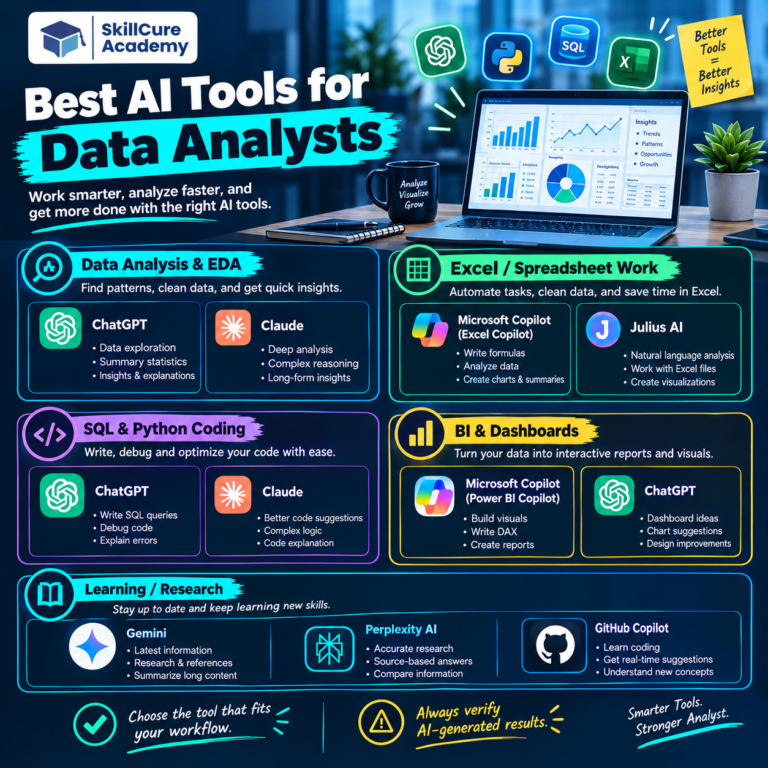
With the growth of artificial intelligence, tools such as ChatGPT are changing how people approach these tasks. ChatGPT can help beginners understand data, write formulas and code, identify patterns, create analysis plans, and explain complex results in simple language.
However, ChatGPT is not a replacement for data analysis skills. The best results come when you combine AI assistance with knowledge of tools such as Excel, SQL, Power BI, Python, and basic statistics.
This complete guide explains how beginners can use ChatGPT for data analysis effectively.
What Is ChatGPT for Data Analysis?
ChatGPT is an AI assistant that can understand natural-language instructions and help users work with information, code, formulas, and analytical problems.
For data analysis, you can use ChatGPT to:
- Understand a dataset and its columns.
- Generate Excel formulas.
- Write and explain SQL queries.
- Create Python code for analysis.
- Suggest data-cleaning techniques.
- Identify potential trends and patterns.
- Explain statistical concepts.
- Help design dashboards.
- Generate ideas for KPIs.
- Interpret analytical results.
- Debug formulas and code.
- Prepare interview questions for data analyst roles.
The important point is that ChatGPT works best as an AI-powered assistant for data analysis, while the analyst remains responsible for validating the results.
Why Should Beginners Use ChatGPT for Data Analysis?
Learning data analysis can initially feel overwhelming because beginners have to understand multiple tools and concepts.
ChatGPT can make the learning process easier by providing step-by-step explanations and examples.
1. Simplifies Complex Concepts.
You can ask ChatGPT to explain concepts such as correlation, regression, joins, pivot tables, or statistical significance in beginner-friendly language.
For example:
Prompt:
Explain SQL JOINs to me as if I am a beginner and give me three practical examples.
Instead of searching through multiple resources, you can get a structured explanation and then ask follow-up questions.
2. Helps Write Formulas and Queries.
Beginners often struggle with syntax. ChatGPT can help generate formulas, SQL queries, and Python code based on a specific requirement.
For example:
Write an Excel formula to calculate the percentage change between January and February sales.
You should still check the formula against your actual dataset before using it.
3. Speeds Up Data Cleaning.
Data cleaning can involve missing values, duplicates, inconsistent spellings, incorrect data types, and formatting problems.
ChatGPT can suggest approaches for handling these issues and provide formulas or Python code to implement them.
4. Helps With Data Interpretation.
After performing analysis, the next challenge is understanding what the numbers mean.
You can ask ChatGPT to help explain:
- Sales trends.
- Customer behavior.
- Product performance.
- Regional performance.
- Changes over time.
- Outliers.
- Key business metrics.
The analyst should verify these interpretations against the original data and business context.
How to Use ChatGPT for Data Analysis?
A good data analysis workflow can be divided into several stages.
| Stage | How ChatGPT Can Help |
|---|---|
| Define the problem | Suggest analytical questions and KPIs. |
| Understand data | Explain columns and data types. |
| Clean data | Suggest methods for duplicates and missing values. |
| Analyze data | Generate formulas, SQL, or Python code. |
| Visualize data | Recommend suitable charts. |
| Interpret results | Explain patterns and trends. |
| Present findings | Help structure insights and recommendations. |
Let’s look at each stage in more detail.
Step 1: Define the Business Problem
Before analyzing data, you need to understand what question you are trying to answer.
For example, instead of simply asking:
Analyze this sales data.
A better approach is:
Analyze monthly sales data to identify the best-performing products, regions with declining sales, and months with the highest revenue.
This gives the analysis a clear objective.
ChatGPT can help you convert a broad business problem into specific analytical questions.
Example Questions
- Which products generate the most revenue?
- Which region has the highest sales?
- Which customers contribute the most revenue?
- Are sales increasing or decreasing?
- Which month has the highest growth?
- Which products have declining performance?
Step 2: Understand Your Dataset
Before performing calculations, understand the structure of your data.
A typical sales dataset might contain:
| Column | Meaning |
|---|---|
| Order ID | Unique order number. |
| Order Date | Date of purchase. |
| Customer | Customer name or ID. |
| Product | Product purchased. |
| Category | Product category. |
| Region | Sales region. |
| Quantity | Number of units sold. |
| Sales | Revenue generated. |
| Profit | Profit generated. |
You can ask ChatGPT:
Explain what analytical questions I can answer using these columns.
This can help beginners understand the potential of their dataset.
Step 3: Clean the Data
Data quality has a major impact on analytical results.
Common data-cleaning problems include:
- Duplicate records.
- Missing values.
- Incorrect dates.
- Inconsistent category names.
- Incorrect numerical values.
- Extra spaces.
- Different spellings of the same item.
For example, a dataset may contain:
Delhi
delhi
DELHI
Although these values represent the same location, they may be treated as different categories during analysis.
ChatGPT can suggest Excel, SQL, or Python techniques to standardize such data.
Step 4: Use ChatGPT With Excel
Excel remains one of the most widely used tools for data analysis.
ChatGPT can help you create and understand formulas such as:
- XLOOKUP.
- SUMIFS.
- COUNTIFS.
- IF.
- INDEX-MATCH.
- TEXT functions.
- Date functions.
- Conditional calculations.
For example:
I have a Sales column and a Profit column. How can I calculate profit margin in Excel?
ChatGPT can provide the formula and explain how it works.
It can also help troubleshoot errors such as:
- #N/A.
- #VALUE!
- #REF!
- #DIV/0!
However, always test formulas using sample rows before applying them to an entire dataset.
Step 5: Use ChatGPT With SQL
SQL is an important skill for data analysts because business data is frequently stored in databases.
ChatGPT can help beginners understand SQL concepts including:
- SELECT.
- WHERE.
- GROUP BY.
- ORDER BY.
- JOIN.
- CASE WHEN.
- Subqueries.
- Common Table Expressions.
- Window functions.
- Aggregate functions.
For example, you could ask:
Write a SQL query to find the top 10 products by total sales.
You can then ask:
Explain this query line by line for a beginner.
This makes ChatGPT useful not only for generating queries but also for learning SQL.
Step 6: Use ChatGPT With Python
Python is widely used for advanced data analysis and automation.
Libraries commonly used by data analysts include:
- Pandas.
- NumPy.
- Matplotlib.
- Seaborn.
- Scikit-learn.
For example, you can ask:
Write Python code using Pandas to find missing values in every column of my dataset.
You can also ask ChatGPT to explain the generated code.
This is especially useful for beginners who understand the analytical objective but are still learning Python syntax.
Step 7: Find Patterns and Trends
Once the data has been cleaned, you can start looking for patterns.
For example, a sales analysis might reveal:
- Revenue increased during specific months.
- One region contributes most of the sales.
- A particular product category generates higher margins.
- Some products have high sales but low profit.
- Customer purchases are concentrated among a small group.
ChatGPT can help you identify which metrics or comparisons are worth investigating.
However, do not blindly accept AI-generated conclusions. Check the underlying numbers.
Step 8: Choose the Right Data Visualization
Visualization makes analytical findings easier to understand.
ChatGPT can help you select an appropriate chart based on your objective.
| Objective | Recommended Visualization |
|---|---|
| Compare categories | Bar chart. |
| Show trends over time | Line chart. |
| Show proportions | Pie or doughnut chart where appropriate. |
| Analyze relationships | Scatter plot. |
| Compare distributions | Histogram or box plot. |
| Track KPIs | KPI cards. |
For example:
I need to show monthly revenue trends for 12 months. Which chart should I use and why?
ChatGPT can recommend a line chart and explain the reasoning.
Step 9: Build Better Dashboards
ChatGPT can also help with dashboard planning.
For a sales dashboard, you might include:
- Total Revenue.
- Total Profit.
- Total Orders.
- Average Order Value.
- Monthly Sales.
- Sales by Region.
- Sales by Category.
- Top 10 Products.
- Profit Margin.
You can ask ChatGPT:
Design a Power BI dashboard for an e-commerce sales dataset. Suggest KPIs, charts, filters, and the dashboard layout.
This can help beginners create a structured dashboard before opening Power BI.
Step 10: Generate Insights From Analysis
A good data analyst does more than create charts.
The final objective is to communicate meaningful insights.
For example:
Observation:
North region generated the highest revenue.
Insight:
The North region is the strongest revenue contributor and may provide opportunities for further expansion.
Recommendation:
Analyze the products and customer segments driving North region performance and evaluate whether similar strategies can be applied to other regions.
This distinction between observation, insight, and recommendation is important in professional data analysis.
Best ChatGPT Prompts for Data Analysis Beginners
The quality of the response often depends on the quality of the prompt.
Here are some useful prompts.
Dataset Understanding Prompt
Analyze the structure of this dataset and explain what each column represents. Suggest important business questions I can answer.
Data Cleaning Prompt
Identify common data-quality problems I should check in this dataset and give me a step-by-step cleaning checklist.
Excel Prompt
Create an Excel formula to calculate month-over-month sales growth and explain the formula step by step.
SQL Prompt
Write a SQL query to calculate total sales by product category and sort the results from highest to lowest.
Python Prompt
Write beginner-friendly Python Pandas code to calculate total sales by region and explain every step.
Visualization Prompt
Based on these business questions, recommend the most appropriate Power BI visuals and explain why each visual should be used.
Insight Prompt
Review these analytical results and identify the most important trends, unusual values, and business insights. Clearly separate observations from recommendations.
Common Mistakes to Avoid When Using ChatGPT
ChatGPT can be extremely useful, but beginners should avoid treating it as an automatic answer machine.
1. Copying Code Without Understanding It
If ChatGPT generates SQL or Python code, understand what the code is doing before using it.
2. Trusting Every AI-Generated Result
AI-generated formulas, queries, and interpretations can contain mistakes.
Always validate important results.
3. Providing Poor Context
A vague prompt often produces a generic answer.
Instead of:
Analyze my data.
Try:
I have an e-commerce dataset containing order date, product, category, region, sales, quantity, and profit. I want to identify the products with high revenue but low profit. Suggest an analysis approach.
4. Ignoring Business Context
Numbers alone do not explain why something happened.
An analyst needs to consider business conditions, seasonality, pricing, marketing campaigns, customer behavior, and other relevant factors.
5. Sharing Sensitive Information
Avoid unnecessarily entering confidential business information, personal information, passwords, financial credentials, or other sensitive data into AI tools.
Use anonymized or sample data whenever possible.
ChatGPT vs Traditional Data Analysis
ChatGPT does not replace traditional data-analysis tools. Instead, it can work alongside them.
| Area | Traditional Approach | With ChatGPT |
|---|---|---|
| Learning | Search documentation and tutorials. | Ask for explanations and examples. |
| Excel | Build formulas manually. | Get formula suggestions and explanations. |
| SQL | Write queries manually. | Generate, explain, and debug queries. |
| Python | Write code from scratch. | Generate and explain code. |
| Visualization | Research chart types. | Get visualization recommendations. |
| Insights | Manually explore results. | Get suggestions for areas to investigate. |
The strongest approach is to combine human analytical thinking + traditional tools + AI assistance.
Skills You Still Need to Become a Data Analyst
Learning ChatGPT alone is not enough to become a professional data analyst.
Beginners should develop skills in:
- Excel.
- SQL.
- Power BI or Tableau.
- Python.
- Statistics.
- Data cleaning.
- Data visualization.
- Business understanding.
- Problem-solving.
- Communication.
- Presentation skills.
AI can make these skills easier to learn and apply, but it does not eliminate the need to understand them.
A Beginner’s Roadmap for AI-Powered Data Analysis
If you are starting from zero, follow a structured approach.
Step 1: Learn Excel fundamentals and data cleaning.
Step 2: Learn basic statistics and analytical concepts.
Step 3: Learn SQL for querying databases.
Step 4: Learn Power BI for dashboards and visualization.
Step 5: Learn Python and Pandas for advanced analysis.
Step 6: Start using ChatGPT to accelerate learning and problem-solving.
Step 7: Work on real-world datasets and projects.
Step 8: Practice explaining your insights and recommendations.
Step 9: Build a portfolio of data analysis projects.
Step 10: Prepare for data analyst interviews using practical questions and case studies.
Frequently Asked Questions
1. Can ChatGPT be used for data analysis?
Yes. ChatGPT can assist with data analysis by helping users understand datasets, generate formulas and SQL queries, write Python code, suggest visualizations, troubleshoot errors, and interpret analytical results.
2. Is ChatGPT enough to become a data analyst?
No. ChatGPT is an AI assistant, not a complete data analyst training program. You should learn tools such as Excel, SQL, Power BI, Python, and statistics along with business and communication skills.
3. Can ChatGPT analyze Excel data?
Yes, when the relevant data is provided through a supported workflow, ChatGPT can help examine and reason about spreadsheet data. It can also help create formulas, identify potential issues, and suggest analytical approaches.
4. Can beginners learn data analysis using ChatGPT?
Yes. Beginners can use ChatGPT as a learning assistant to understand concepts, practice SQL and Python, troubleshoot formulas, create project ideas, and prepare for interviews. However, they should verify results and understand the underlying concepts.
5. Will AI replace data analysts?
AI is more likely to change the responsibilities of data analysts than simply eliminate the role. Analysts who can combine data skills with AI tools, business understanding, critical thinking, and communication can become more productive and valuable.
Start Building Your Data Analysis Skills
ChatGPT can significantly improve the way beginners learn and practice data analysis. It can reduce the time required to understand technical concepts, troubleshoot problems, generate code, and explore analytical ideas.
But effective data analysis still depends on human judgment. Knowing what question to ask, which data to use, how to validate a result, and what business action should follow remains extremely important.
For anyone planning a career in data analytics, the ideal approach is not to choose between AI and traditional data-analysis skills. Instead, learn the fundamentals and use AI as a productivity and learning partner.
With practical experience in Excel, SQL, Power BI, Python, statistics, and AI tools such as ChatGPT, beginners can build a strong foundation for a modern data analytics career.