
Video content has become one of the most powerful ways to communicate with an audience. From YouTube videos and Instagram Reels to business advertisements, online courses, product promotions, and short-form content, video is now an important part of digital communication.
If you are planning to learn video editing, choosing the right software is one of the first decisions you need to make. Beginners usually need software that is easy to understand, provides useful editing tools, and allows them to create professional-looking videos without spending months learning complicated features.
But with so many video editing applications available, one question is common:
Which is the best video editing software for beginners in 2026?
In this blog, we will discuss some of the best video editing software for beginners, their features, advantages, limitations, and the type of content they are best suited for.
What Is Video Editing Software?
Video editing software is a computer or mobile application used to modify, arrange, and improve video content.
Using video editing software, you can:
- Cut and trim video clips
- Add background music
- Add text and subtitles
- Add transitions
- Apply visual effects
- Adjust colors and brightness
- Add voiceovers
- Remove unwanted sections
- Add animations
- Create videos for YouTube and social media
For beginners, it is better to start with software that is easy to understand and then gradually move toward advanced professional tools.
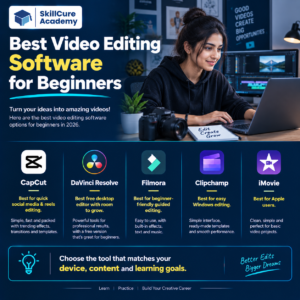
Best Video Editing Software for Beginners in 2026 ?
| Software | Best For | Difficulty Level | Platform |
|---|---|---|---|
| CapCut | Reels, Shorts & Social Media | Easy | Windows, Mac, Mobile, Web |
| Canva | Simple Social Media Videos | Very Easy | Web, Windows, Mac, Mobile |
| Filmora | Beginner-Friendly Editing | Easy | Windows, Mac |
| Adobe Premiere Pro | Professional Video Editing | Advanced | Windows, Mac |
| DaVinci Resolve | Editing & Color Grading | Moderate | Windows, Mac, Linux |
| iMovie | Apple Beginners | Easy | Mac, iPhone, iPad |
| Clipchamp | Basic Video Editing | Easy | Windows, Web |
1. CapCut
CapCut is a popular choice for beginners who want to create short-form video content. It is particularly useful for Instagram Reels, YouTube Shorts and other social media videos.
Its simple interface makes it easier for new users to learn basic editing.
Key Features
- Video trimming and splitting
- Text and captions
- Transitions
- Filters and effects
- Background music
- Templates
- AI-assisted editing features
- Social media-friendly video formats
Best For
CapCut is suitable for beginners who want to create Reels, Shorts and social media videos quickly.
2. Canva
Canva is widely known for graphic design, but it also offers simple video editing features.
Its drag-and-drop interface makes it easy for beginners to combine videos, images, text, animations and music.
Key Features
- Drag-and-drop editing
- Ready-made templates
- Text animations
- Stock images and videos
- Music and audio
- Social media formats
- Simple transitions
Best For
Canva is useful for students, marketers, business owners and beginners who want to create simple promotional videos and social media content.
3. Wondershare Filmora
Filmora is designed to provide powerful editing features while keeping the interface relatively simple.
It can be used to create YouTube videos, educational videos, promotional content and social media videos.
Key Features
- Timeline editing
- Video transitions
- Effects
- Titles
- Audio editing
- Color adjustment
- Green-screen editing
- Motion tracking
- AI-assisted tools
Best For
Filmora is a good option for beginners who want something more advanced than basic editors but easier to learn than professional editing software.
4. Adobe Premiere Pro
Adobe Premiere Pro is one of the most widely used professional video editing applications.
It provides advanced tools for editing YouTube videos, advertisements, corporate videos, documentaries and professional productions.
Key Features
- Multi-track editing
- Advanced audio editing
- Color correction
- Professional transitions
- Motion graphics integration
- AI-powered features
- Multiple video formats
- Professional editing workflow
Best For
Premiere Pro is suitable for learners who want to build a professional career in video editing and eventually work on complex projects.
However, beginners may need more time and practice to become comfortable with the software.
5. DaVinci Resolve
DaVinci Resolve is a powerful application that combines video editing, color correction, visual effects and audio post-production.
It is a strong option for learners who want to develop professional editing skills.
Key Features
- Professional video editing
- Color grading
- Visual effects
- Audio editing
- Motion graphics
- Multi-camera editing
- Professional export options
Best For
DaVinci Resolve is ideal for beginners who are serious about learning professional video editing and color grading.
6. iMovie
If you are an Apple user, iMovie can be a simple starting point for learning video editing.
It provides basic editing tools without overwhelming beginners with too many complicated options.
Key Features
- Video trimming
- Titles
- Music
- Transitions
- Basic effects
- Simple timeline editing
- Easy video export
Best For
iMovie is best for Mac, iPhone and iPad users who want to learn basic video editing.
7. Microsoft Clipchamp
Clipchamp is a beginner-friendly video editing solution available for Windows and through the web.
It is useful for creating simple videos without requiring advanced editing knowledge.
Key Features
- Video trimming
- Templates
- Text
- Transitions
- Stock media
- Screen recording
- Basic audio editing
Best For
Clipchamp is suitable for beginners who want to create basic videos, presentations, tutorials and social media content.
Free vs Paid Video Editing Software
One of the biggest questions beginners have is whether they should start with free or paid software.
| Factor | Free Software | Paid Software |
|---|---|---|
| Cost | Free | Subscription or one-time payment |
| Basic Editing | Usually available | Available |
| Advanced Effects | Limited in some tools | More options |
| Templates | Available | Usually more options |
| Professional Features | Depends on software | Generally more extensive |
| Beginner Friendly | Usually yes | Depends on software |
| Career Use | Depends on tool | Strong professional options |
You don’t necessarily need expensive software when you are starting.
The best approach is to learn the fundamentals first and upgrade your software when your editing requirements become more advanced.
How to Choose the Best Video Editing Software?
Before selecting software, consider your purpose.
1. Identify Your Content Type
Think about what you want to create.
For example:
- YouTube videos
- Instagram Reels
- YouTube Shorts
- Educational videos
- Business advertisements
- Product videos
- Wedding videos
- Travel videos
Your content type can help determine which software is most suitable.
2. Consider Your Computer
Professional video editing can require significant processing power.
Before choosing advanced software, check:
- RAM
- Processor
- Graphics card
- Storage
- Available disk space
If you have a basic computer, starting with lightweight editing software may provide a better experience.
3. Check the Learning Curve
Beginners should avoid selecting software only because it has hundreds of features.
A tool that is easy to understand can help you start practicing faster.
4. Look at Future Career Goals
If you are learning video editing as a hobby, a simple tool may be enough.
However, if you want to work professionally, consider learning industry-relevant tools such as Adobe Premiere Pro or DaVinci Resolve after building your basic editing skills.
Skills You Should Learn Along With Video Editing Software
Learning software alone is not enough to become a good video editor.
You should also develop skills such as:
- Storytelling
- Video composition
- Timing and pacing
- Audio editing
- Color correction
- Color grading
- Typography
- Motion graphics
- Transitions
- Thumbnail design
- Social media video formats
These skills can help you create videos that are not only technically edited but also engaging for viewers.
Career Opportunities After Learning Video Editing
Video editing skills can open opportunities in different industries.
Some possible career options include:
| Career | Typical Work |
|---|---|
| Video Editor | Editing videos for clients and companies |
| YouTube Video Editor | Editing creator content |
| Social Media Video Editor | Creating Reels and Shorts |
| Motion Graphics Designer | Creating animated graphics |
| Content Creator | Producing your own video content |
| Freelance Video Editor | Working with multiple clients |
| Advertising Video Editor | Creating promotional videos |
With the growth of social media, digital marketing and online content, video editing skills can be useful across many industries.
How Beginners Can Start Learning Video Editing
You don’t need to learn everything at once.
Follow a simple learning path:
Step 1: Learn basic video cutting and trimming.
Step 2: Learn how to work with a timeline.
Step 3: Learn text, transitions and audio.
Step 4: Practice color correction and basic effects.
Step 5: Learn storytelling and pacing.
Step 6: Create your own projects.
Step 7: Build a video editing portfolio.
Step 8: Start applying for internships, freelance projects or jobs.
The most important thing is consistent practice. Watching tutorials without actually editing videos will not build strong practical skills.
Why Practical Learning Matters
Video editing is a practical skill. You can understand editing concepts theoretically, but real improvement comes from working on actual projects.
For example, instead of only watching a tutorial about transitions, create a short video and experiment with different transitions.
Similarly, practice:
- Editing raw footage
- Adding background music
- Creating captions
- Removing unnecessary clips
- Improving audio
- Creating social media videos
- Making promotional videos
Practical projects can also help you build a portfolio that demonstrates your skills to potential employers or clients.
Final Thoughts
Choosing the best video editing software for beginners in 2026 depends on your goals, computer, budget and type of content.
If you want simple social media editing, tools like CapCut and Canva can be good starting points. If you want a more structured editing experience, Filmora is worth considering. For professional career development, learning tools such as Adobe Premiere Pro and DaVinci Resolve can be valuable.
Remember, software is only a tool. Your creativity, storytelling, editing sense and practical experience ultimately determine the quality of your work.
Start with one software, learn the fundamentals, practice consistently and gradually move toward advanced editing techniques.
Frequently Asked Questions
1. Which video editing software is best for beginners?
CapCut, Canva, Filmora and Clipchamp are beginner-friendly options. The best choice depends on the type of videos you want to create.
2. Can I learn video editing without experience?
Yes. Beginners can learn video editing from scratch through tutorials, structured learning and regular project practice.
3. Is Adobe Premiere Pro good for beginners?
Premiere Pro is a powerful professional tool, but it has a steeper learning curve. Beginners can learn it gradually through practical projects.
4. Is DaVinci Resolve good for learning professional video editing?
Yes. DaVinci Resolve provides professional editing, color grading, visual effects and audio tools, making it useful for learners who want to develop advanced skills.
5. Can video editing become a career?
Yes. Video editors can work with production companies, digital marketing agencies, YouTube creators, businesses or as freelancers. Building a strong portfolio and practical skills can improve career opportunities.