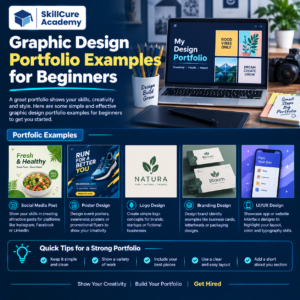

A graphic design portfolio is one of the most important things a beginner needs when starting a career in graphic design. Whether you are applying for a graphic design job, freelancing, or approaching clients, your portfolio helps you show what you can actually create.
For beginners, building a portfolio can feel difficult because you may not have professional client projects yet. The good news is that you can create portfolio projects on your own and use them to demonstrate your creativity, design skills, and understanding of visual communication.
In this blog, we will explore graphic design portfolio examples for beginners, what projects you should include, how to create a strong portfolio, and common mistakes you should avoid.
What Is a Graphic Design Portfolio?
A graphic design portfolio is a collection of your best design projects that demonstrates your skills and creative thinking.
It can include different types of work such as:
- Social media posts
- Logos
- Business cards
- Posters
- Brochures
- Website designs
- YouTube thumbnails
- Product packaging
- Brand identity designs
- Advertisements
Your portfolio should not simply show attractive designs. It should also communicate how you think as a designer.
For example, instead of showing only a logo, you can explain the brand, design concept, colors, typography, and how the logo could be used.
Why Is a Portfolio Important for Beginners?
A degree or certificate can help you start your career, but employers and clients often want to see your actual work.
A good portfolio can help you:
- Demonstrate your creativity
- Show your software skills
- Build credibility
- Attract freelance clients
- Apply for graphic design jobs
- Show your design style
- Stand out from other beginners
For a fresher, a strong portfolio can be especially useful because you may not have extensive professional experience.
Best Graphic Design Portfolio Examples for Beginners
If you are a beginner, you don’t need to wait for a client project to create your portfolio.
You can create self-initiated projects that demonstrate different design skills.
| Portfolio Project | Skills You Can Demonstrate |
|---|---|
| Logo Design | Branding, typography, creativity |
| Social Media Post | Layout, visual hierarchy |
| Poster Design | Composition, typography |
| Business Card | Branding, print design |
| YouTube Thumbnail | Digital design, attention-grabbing layouts |
| Brand Identity | Color, typography, consistency |
| Packaging Design | Product presentation |
| Brochure | Information layout |
| Advertisement | Marketing-focused design |
| Website UI | Digital design and user experience |
1. Logo Design Portfolio
Logo design is one of the most common projects beginners can add to a portfolio.
You can create a fictional brand and develop a logo for it.
For example, create a brand called Urban Brew, a fictional coffee shop.
Your project can include:
- Primary logo
- Alternative logo
- Color palette
- Typography
- Logo mockups
- Brand usage examples
Don’t just show the final logo. Explain the idea behind your design.
2. Social Media Design Portfolio
Social media graphics are excellent projects for beginners because businesses need social media content across different industries.
You can create posts for:
- Restaurants
- Fitness brands
- Educational institutes
- Fashion brands
- Technology companies
- Real estate companies
- E-commerce businesses
Create a small social media campaign instead of just one post.
For example:
Brand: Fitness Studio
Campaign:
- New membership offer
- Workout tips
- Customer testimonial
- Motivational quote
- Weekend promotion
This shows that you can maintain a consistent visual style.
3. Poster Design
Poster design is another excellent beginner project.
Create posters for fictional events such as:
- Music festivals
- College events
- Workshops
- Product launches
- Business conferences
- Sports events
Focus on:
- Typography
- Color combinations
- Visual hierarchy
- Alignment
- Spacing
- Image selection
A good poster should communicate the important information quickly.
4. YouTube Thumbnail Design
YouTube thumbnail design is a useful portfolio category for beginners interested in digital marketing and content creation.
You can create thumbnails for topics such as:
- Technology
- Education
- Finance
- Fitness
- Travel
- Gaming
- Career advice
Try creating several thumbnails for the same fictional YouTube channel so your portfolio shows consistency.
5. Brand Identity Project
A brand identity project can make a beginner’s portfolio look much more professional.
Choose a fictional company and develop a complete visual identity.
For example:
Brand: FreshBite
Industry: Healthy Food
Your project can include:
- Logo
- Brand colors
- Typography
- Business card
- Packaging
- Social media post
- Advertisement
- Brand mockups
This type of project demonstrates that you understand how different designs work together.
6. Business Card Design
Business card design is a simple project, but it can demonstrate your understanding of professional design.
Create a business card for a fictional:
- Photographer
- Marketing agency
- Consultant
- Real estate agent
- Designer
- Software company
Show both the front and back of the card and place the design inside a realistic mockup.
7. Packaging Design
Packaging design is a great way to make your portfolio more creative.
You can design packaging for:
- Coffee
- Chocolate
- Cosmetics
- Snacks
- Perfume
- Skincare
- Beverages
For example, create a fictional coffee brand and design its coffee packet, logo, label, and promotional graphics.
8. Advertisement Design
Advertising projects can demonstrate your ability to combine design and marketing.
Create advertisements for a fictional product or service.
For example:
Product: Wireless Headphones
Create:
- Instagram advertisement
- Website banner
- Promotional poster
- Product launch graphic
This shows that you can adapt one campaign to multiple formats.
9. Brochure Design
Brochures are useful portfolio projects for beginners who want to demonstrate print and information design skills.
You can create brochures for:
- Hotels
- Educational institutes
- Travel agencies
- Real estate companies
- Healthcare businesses
- Corporate companies
Pay attention to information hierarchy, typography, images, spacing, and consistency.
10. Website UI Design
If you are interested in digital design, add a basic website UI project to your portfolio.
You can design:
- Homepage
- About page
- Services page
- Contact page
- Product page
You can use tools such as Figma or other design software to create your layouts.
What Should a Beginner’s Graphic Design Portfolio Include?
A beginner’s portfolio doesn’t need 50 projects.
It is better to have 8–12 strong projects that show different skills.
A simple portfolio structure could look like this:
| Section | What to Include |
|---|---|
| Introduction | Short designer introduction |
| Logo Design | 2–3 projects |
| Social Media | 2–3 projects |
| Posters | 1–2 projects |
| Branding | 1–2 projects |
| Packaging | 1 project |
| UI Design | 1 project |
| Contact | Email/social links |
Quality is more important than quantity.
How to Create Portfolio Projects Without Clients?
One of the biggest problems beginners face is:
“I don’t have any clients. What should I put in my portfolio?”
You can create fictional projects.
Choose a business category and create a complete design project for it.
For example:
Fictional Restaurant Project
Create:
- Restaurant name
- Logo
- Brand colors
- Menu design
- Social media post
- Food advertisement
- Packaging
- Business card
Although the business is fictional, the project demonstrates your ability to solve a design problem.
Just make it clear that the project is a concept/fictitious project.
How to Present a Portfolio Project
Don’t upload only the final design.
Use a simple case-study format:
1. Project Overview
Explain what the project is about.
2. Design Objective
Explain what you wanted the design to achieve.
3. Concept
Explain your creative idea.
4. Design Process
Show sketches, references, color selection, or early concepts where relevant.
5. Final Design
Show the completed design.
6. Mockups
Show how the design could appear in the real world.
This makes your portfolio much more convincing.
Common Mistakes Beginners Should Avoid
A portfolio can become weaker if it contains too many unnecessary designs.
Avoid these mistakes:
- Adding every design you have created
- Using too many different styles
- Poor-quality mockups
- Spelling and grammar mistakes
- Inconsistent typography
- Poor image quality
- Copying other designers
- Not explaining your projects
- Using too many colors
- Creating an overcrowded portfolio
Remember: Your portfolio should show your best work, not all your work.
Tools Beginners Can Use
Beginners can use different design tools depending on their goals.
| Tool | Best For |
|---|---|
| Adobe Photoshop | Image editing and digital graphics |
| Adobe Illustrator | Logos and vector graphics |
| Adobe InDesign | Brochures and print layouts |
| Figma | UI and digital design |
| Canva | Simple social media graphics |
| CorelDRAW | Vector and print design |
Learning the tools is important, but understanding design principles is equally important.
Tips to Make Your Portfolio Look Professional
Follow these simple tips:
Keep It Simple
Don’t make your portfolio unnecessarily complicated. Use a clean layout that allows your work to get attention.
Show Variety
Include different types of projects to demonstrate your skills.
Maintain Quality
Remove weak designs even if you like them personally.
Use Mockups
Mockups help clients and recruiters understand how your designs can be used in real situations.
Explain Your Thinking
A short explanation can make a project much more valuable than simply displaying an image.
Update Your Portfolio
As you create better projects, replace older and weaker work.
Where Can Beginners Create a Graphic Design Portfolio?
There are several platforms where beginners can present their work.
Popular options include:
- Behance
- Dribbble
- Adobe Portfolio
- Personal website
You can also create a PDF portfolio when applying for jobs.
The important thing is to make your portfolio easy to view and easy to share.
Final Checklist for a Beginner Graphic Design Portfolio
Before sharing your portfolio, check the following:
- 8–12 strong projects
- Different design categories
- High-quality images
- Consistent presentation
- Project descriptions
- Design mockups
- Contact information
- No spelling mistakes
- No copied designs
- Updated best work
FAQs.
1. How many projects should a beginner have in a graphic design portfolio?
A beginner can start with around 8–12 strong projects. Focus on quality and variety instead of adding a large number of designs.
2. Can I create a graphic design portfolio without client experience?
Yes. You can create fictional or self-initiated projects to demonstrate your skills. Clearly mention that these are concept projects.
3. What should I include in a graphic design portfolio?
You can include logos, social media designs, posters, branding projects, advertisements, packaging, brochures, business cards, and UI designs.
4. Which tools should beginners learn for graphic design?
Photoshop and Illustrator are useful for many graphic design jobs. Figma is valuable for UI design, while InDesign is useful for print and publication design.
5. Is a portfolio more important than a graphic design certificate?
A certificate can demonstrate that you have completed training, but a portfolio gives employers and clients direct evidence of your practical design skills. Ideally, beginners should have both relevant training and a strong portfolio.