
SAP MM Procurement Process is one of the most important topics for anyone learning SAP MM (Materials Management), preparing for SAP MM interview questions, or looking for a practical SAP MM tutorial for beginners. Understanding the SAP MM P2P (Procure-to-Pay) cycle is especially important because it explains how a company manages purchasing, vendors, goods receipt, invoice verification, and payment.
If you are searching for SAP MM procurement process step by step, SAP MM purchasing process, SAP MM P2P cycle, SAP MM procurement flow, or SAP MM for beginners, this guide will help you understand the complete process in simple English.
Procurement is an essential business activity because organizations regularly need raw materials, office supplies, spare parts, equipment, and services. SAP MM helps businesses manage these purchasing activities in a structured and integrated way.
In this blog, we will understand the SAP MM procurement process step by step, including Purchase Requisition, vendor selection, Purchase Order, Goods Receipt, Invoice Verification, and payment.
SAP MM Procurement Flow
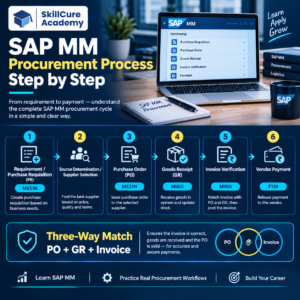
Requirement → Purchase Requisition → Vendor Selection → Purchase Order → Approval → Goods Receipt → Invoice Verification → Vendor Payment
What is SAP MM Procurement?
SAP MM Procurement is the process of purchasing materials and services required by an organization.
SAP MM, or SAP Materials Management, helps companies manage purchasing and inventory-related activities. It connects procurement activities with inventory management and other business processes.
The main objective of procurement is to make sure that the organization gets:
- The right material
- In the right quantity
- At the right price
- From the right vendor
- At the right time
- At the right location
For example, a manufacturing company may need 1,000 units of steel for production. The procurement team needs to identify the requirement, find a suitable vendor, place an order, receive the material, verify the invoice, and complete the payment process.
What is the SAP MM P2P Cycle?
The P2P cycle, or Procure-to-Pay cycle, is one of the most important processes in SAP MM.
It starts when a business identifies a requirement and ends when the vendor receives payment.
SAP MM P2P Cycle:
| Stage | Activity |
|---|---|
| 1 | Requirement Identification |
| 2 | Purchase Requisition |
| 3 | Source/Vendor Determination |
| 4 | Request for Quotation |
| 5 | Vendor Selection |
| 6 | Purchase Order |
| 7 | Purchase Order Approval |
| 8 | Goods Receipt |
| 9 | Invoice Verification |
| 10 | Vendor Payment |
Not every organization uses every step in exactly the same way. The process depends on the company’s business requirements and SAP configuration.
SAP MM Procurement Process Step by Step?
Step 1: Identify the Requirement
The procurement process begins when a department identifies a requirement.
For example, the production department may require:
- Raw materials
- Packaging materials
- Machine spare parts
- Office equipment
- Maintenance services
The department determines what is required, how much is required, and when it is needed.
Example
A manufacturing company needs:
500 units of steel
Required delivery date:
20 October
This requirement is communicated to the purchasing team.
Step 2: Create Purchase Requisition
A Purchase Requisition (PR) is an internal document used to request the purchase of materials or services.
The PR contains important information such as:
- Material or service
- Quantity
- Required delivery date
- Plant
- Storage location, where applicable
- Account assignment, where applicable
- Other purchasing information
A PR is an internal request. It is not normally sent directly to the vendor as a purchase commitment.
Example
The production department creates a PR for:
500 units of steel required by 20 October.
The PR then goes through the required approval process.
Step 3: Source Determination
After the requirement is approved, the purchasing team needs to determine where the material or service should be purchased.
SAP MM can support source determination using information such as:
- Existing vendors
- Purchasing information records
- Source lists
- Contracts
- Scheduling agreements
- Previous purchasing history
The objective is to identify a suitable source of supply.
Step 4: Request for Quotation
If the company wants to compare prices from different vendors, it can send a Request for Quotation (RFQ).
An RFQ asks vendors to provide their prices and purchasing conditions.
For example:
| Vendor | Price/Unit | Delivery | Payment Terms |
|---|---|---|---|
| Vendor A | ₹100 | 7 Days | 30 Days |
| Vendor B | ₹95 | 10 Days | 30 Days |
| Vendor C | ₹102 | 5 Days | 45 Days |
The purchasing team can compare the quotations before selecting the most suitable vendor.
The lowest price is not always the only deciding factor. Businesses may also consider quality, delivery time, reliability, payment terms, and previous vendor performance.
Step 5: Vendor Selection
After evaluating available suppliers, the company selects the appropriate vendor.
The selection can depend on:
- Price
- Product quality
- Delivery time
- Vendor reliability
- Payment terms
- Previous performance
- Contract conditions
- Business requirements
Once the vendor is selected, the purchasing department can proceed with the Purchase Order.
Step 6: Create Purchase Order
A Purchase Order (PO) is an official purchasing document sent to the vendor.
It tells the vendor what the company wants to purchase and under what conditions.
A Purchase Order may contain:
- Vendor details
- Material or service
- Quantity
- Price
- Delivery date
- Plant
- Storage location
- Payment terms
- Tax information
- Delivery conditions
- Other purchasing conditions
Example
The company selects Vendor B.
Quantity: 500 units
Price: ₹95 per unit
Therefore:
500 × ₹95 = ₹47,500
The Purchase Order is created for ₹47,500 and sent to the vendor.
Step 7: Purchase Order Approval
Depending on company policy, the Purchase Order may require approval before it is sent to the vendor.
For example:
| PO Value | Possible Approval |
|---|---|
| Below ₹50,000 | Department Manager |
| ₹50,000–₹5,00,000 | Procurement Manager |
| Above ₹5,00,000 | Senior Management |
The actual approval limits and workflow depend on the organization’s configuration.
SAP can support approval processes through release procedures or workflow-based mechanisms.
This helps organizations maintain purchasing control and prevent unauthorized purchases.
Step 8: Goods Receipt
After the Purchase Order is accepted, the vendor delivers the material.
The warehouse or receiving department checks the delivered goods.
They may verify:
- Quantity
- Material
- Quality
- Packaging
- Delivery information
- Purchase Order reference
If the material is accepted, the company records a Goods Receipt (GR) in SAP.
Example
Purchase Order:
500 units
Material received:
500 units
The goods receipt is recorded against the relevant purchase order.
For stock materials, the goods receipt generally results in an increase in inventory, subject to the company’s configuration and the type of transaction.
Step 9: Invoice Verification
After delivering the material, the vendor sends an invoice.
The invoice needs to be checked before payment.
One of the most important concepts here is three-way matching.
Three-Way Matching
SAP procurement commonly compares:
Purchase Order + Goods Receipt + Invoice
For example:
| Document | Quantity | Price |
|---|---|---|
| Purchase Order | 500 | ₹95 |
| Goods Receipt | 500 | ₹95 |
| Invoice | 500 | ₹95 |
If the information matches within the configured tolerances, the invoice can be posted.
This helps organizations reduce:
- Incorrect payments
- Duplicate payments
- Quantity mismatches
- Price discrepancies
- Invoice errors
Step 10: Vendor Payment
After successful invoice verification, the financial department processes the payment according to the agreed payment terms.
For example:
Payment Terms: 30 Days
The vendor payment process is primarily handled through SAP FI, but it is closely integrated with the SAP MM procurement process.
This integration allows purchasing and financial transactions to work together.
SAP MM Procurement Process Example
Let’s understand the complete process with one simple example.
Suppose ABC Manufacturing needs 1,000 units of raw material.
Procurement Flow
1. Requirement
Production department requires 1,000 units.
↓
2. Purchase Requisition
A PR is created for 1,000 units.
↓
3. Vendor Search
The purchasing team identifies suitable suppliers.
↓
4. RFQ
Quotations are requested from selected vendors.
↓
5. Vendor Selection
The company selects the most suitable supplier.
↓
6. Purchase Order
A PO is created and approved.
↓
7. Goods Receipt
The vendor delivers 1,000 units and the warehouse records the receipt.
↓
8. Invoice Verification
The invoice is checked against the PO and goods receipt.
↓
9. Payment
Finance processes payment according to the agreed terms.
This complete flow represents the SAP MM Procure-to-Pay process.
Important SAP MM Procurement Documents
Understanding the documents used in procurement is important for both SAP MM learners and interview preparation.
| Document | Purpose |
|---|---|
| Purchase Requisition | Internal request for material or service |
| RFQ | Request sent to vendors for quotations |
| Quotation | Vendor’s offer with price and conditions |
| Purchase Order | Official document for purchasing |
| Goods Receipt | Records receipt of materials |
| Invoice | Vendor’s billing document |
| Accounting Document | Records financial impact |
Important SAP MM Transactions
SAP MM learners often come across transaction codes during training and practical work.
| Transaction | Common Purpose |
|---|---|
| ME51N | Create Purchase Requisition |
| ME52N | Change Purchase Requisition |
| ME53N | Display Purchase Requisition |
| ME21N | Create Purchase Order |
| ME22N | Change Purchase Order |
| ME23N | Display Purchase Order |
| MIGO | Goods Movement / Goods Receipt |
| MIRO | Enter Incoming Invoice |
| ME41 | Create RFQ |
| ME47 | Maintain Quotation |
Transaction availability and usage can vary depending on the SAP version, configuration, and business process.
Why is SAP MM Procurement Important?
SAP MM procurement helps organizations create a structured purchasing process.
Some major benefits include:
- Better purchasing control
- Improved vendor management
- Accurate inventory records
- Better purchase tracking
- Reduced manual errors
- Improved cost control
- Faster procurement processes
- Better documentation
- Improved transparency
- Integration with finance
- Better monitoring of purchase orders
For large organizations handling thousands of purchase transactions, having a centralized procurement system can make operations much easier to manage.
SAP MM Integration with Other Modules
SAP MM does not work independently. It integrates with several other SAP modules.
SAP MM and SAP FI
Procurement transactions can create financial impacts, especially during goods receipt and invoice processing.
SAP MM and SAP PP
Production planning may generate requirements for raw materials that eventually need to be procured.
SAP MM and SAP SD
Material availability and inventory can be relevant to sales and distribution activities.
SAP MM and SAP WM/EWM
Warehouse-related processes can be integrated with material and inventory management depending on the SAP landscape.
This integration is one of the major reasons SAP is widely used for managing complex business processes.
SAP MM Procurement Process vs Traditional Procurement
| Traditional Procurement | SAP MM Procurement |
|---|---|
| More manual work | System-based process |
| Paper or separate records | Centralized data |
| Difficult tracking | Better document tracking |
| Higher risk of manual errors | Automated validations |
| Limited visibility | Better process visibility |
| Separate systems may be used | Integrated SAP processes |
The exact benefits depend on how the SAP system is implemented and configured.
SAP MM Interview Questions
If you are preparing for an SAP MM interview, you should understand these questions:
- What is SAP MM?
- What is the SAP MM procurement process?
- What is a Purchase Requisition?
- What is the difference between PR and PO?
- What is a Purchase Order?
- What is the P2P cycle in SAP MM?
- What is Goods Receipt?
- What is Invoice Verification?
- What is three-way matching?
- What is an RFQ?
- What is source determination?
- How does SAP MM integrate with SAP FI?
- What is the difference between Goods Receipt and Invoice Receipt?
- What are the important documents in the procurement cycle?
- What is the role of a vendor in SAP MM?
For interviews, don’t just memorize definitions. Try to explain the complete business scenario from requirement to payment.
How to Learn SAP MM Effectively
If you are a beginner, start with the fundamentals before moving into complex configuration and business scenarios.
A practical learning path can include:
- SAP MM fundamentals
- Organizational structure
- Material master
- Vendor/business partner concepts
- Purchase Requisition
- RFQ and quotation
- Purchase Order
- Source determination
- Goods Receipt
- Invoice Verification
- Inventory Management
- Vendor management
- SAP MM-FI integration
- Real-world procurement scenarios
- SAP MM interview preparation
Practicing complete business scenarios can help you understand how different SAP MM documents are connected.
Frequently Asked Questions
1. What is the SAP MM procurement process?
The SAP MM procurement process is the purchasing cycle used to acquire materials and services. It can include requirement identification, Purchase Requisition, source determination, Purchase Order, Goods Receipt, Invoice Verification, and payment.
2. What is the P2P cycle in SAP MM?
P2P stands for Procure-to-Pay. It represents the process from identifying a purchasing requirement through purchasing, receiving the material, verifying the invoice, and completing vendor payment.
3. What is the difference between PR and PO in SAP MM?
A Purchase Requisition (PR) is an internal request to purchase a material or service. A Purchase Order (PO) is an official purchasing document issued to the vendor.
4. What is Goods Receipt in SAP MM?
Goods Receipt is the process of recording that materials ordered from a vendor have been received. It can also update inventory and create accounting impacts depending on the transaction and configuration.
5. What is three-way matching in SAP?
Three-way matching compares the Purchase Order, Goods Receipt, and Invoice to verify that the purchased quantity and price are consistent before the invoice is processed.