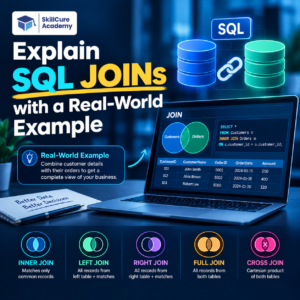

When working with databases, data is often stored in multiple tables instead of keeping everything in one large table. SQL JOINs help you bring related data from these different tables together.
For example, an e-commerce company may store customer information in one table and order information in another. If you want to know which customers placed which orders, you can use a SQL JOIN.
Understanding JOINs is one of the most important SQL skills for Data Analysts, because real-world datasets commonly contain information spread across multiple tables.
What is a SQL JOIN?
A SQL JOIN is used to combine rows from two or more tables based on a related column.
For example, imagine you have these two tables:
Customers Table
| Customer_ID | Customer_Name | City |
|---|---|---|
| 101 | Rahul | Delhi |
| 102 | Priya | Mumbai |
| 103 | Aman | Jaipur |
| 104 | Neha | Pune |
Orders Table
| Order_ID | Customer_ID | Product | Amount |
|---|---|---|---|
| 5001 | 101 | Laptop | ₹60,000 |
| 5002 | 102 | Mouse | ₹1,200 |
| 5003 | 101 | Keyboard | ₹2,500 |
| 5004 | 103 | Monitor | ₹15,000 |
Here, Customer_ID is the common column between the two tables.
Using a JOIN, we can connect the customer information with their orders.
Why are SQL JOINs important?
In real-world databases, storing everything in a single table can create duplicate and unnecessary information.
Instead, companies usually divide information into logical tables.
For example:
- Customer details →
Customers - Orders →
Orders - Products →
Products - Employees →
Employees - Departments →
Departments - Payments →
Payments
SQL JOINs allow analysts to connect this information when they need to perform analysis.
For example, a business analyst might need to answer:
- Which customers purchased the most?
- Which products generated the highest revenue?
- Which department has the most employees?
- Which customers have never placed an order?
- What is the total revenue generated by each city?
JOINs make these types of questions possible.
Types of SQL JOINs
The most commonly used SQL JOINs are:
| JOIN Type | What It Does |
|---|---|
| INNER JOIN | Returns matching records from both tables |
| LEFT JOIN | Returns all records from the left table and matching records from the right |
| RIGHT JOIN | Returns all records from the right table and matching records from the left |
| FULL OUTER JOIN | Returns all records from both tables |
| CROSS JOIN | Combines every row from one table with every row from another |
Let’s understand them with our customer and order example.
1. INNER JOIN
An INNER JOIN returns only the records that have a match in both tables.
Suppose we want to see customers who have placed orders.
SELECT
    Customers.Customer_Name,
    Orders.Product,
    Orders.Amount
FROM Customers
INNER JOIN Orders
ON Customers.Customer_ID = Orders.Customer_ID;
Result
| Customer_Name | Product | Amount |
|---|---|---|
| Rahul | Laptop | ₹60,000 |
| Priya | Mouse | ₹1,200 |
| Rahul | Keyboard | ₹2,500 |
| Aman | Monitor | ₹15,000 |
Notice that Neha is not included because she doesn’t have an order in the Orders table.
Real-world use
An e-commerce company could use an INNER JOIN to analyze customers who actually made purchases.
2. LEFT JOIN
A LEFT JOIN returns every record from the left table, along with matching records from the right table.
SELECT
    Customers.Customer_Name,
    Orders.Product,
    Orders.Amount
FROM Customers
LEFT JOIN Orders
ON Customers.Customer_ID = Orders.Customer_ID;
Result
| Customer_Name | Product | Amount |
|---|---|---|
| Rahul | Laptop | ₹60,000 |
| Priya | Mouse | ₹1,200 |
| Rahul | Keyboard | ₹2,500 |
| Aman | Monitor | ₹15,000 |
| Neha | NULL | NULL |
Neha appears even though she has no order.
This is one of the most useful JOINs for Data Analysts.
For example, if a company wants to identify customers who registered but never purchased anything, a LEFT JOIN can help.
You can then filter for missing orders:
SELECT
    Customers.Customer_Name
FROM Customers
LEFT JOIN Orders
ON Customers.Customer_ID = Orders.Customer_ID
WHERE Orders.Order_ID IS NULL;
This would return:
| Customer_Name |
|---|
| Neha |
3. RIGHT JOIN
A RIGHT JOIN returns all records from the right table and matching records from the left table.
SELECT
    Customers.Customer_Name,
    Orders.Product,
    Orders.Amount
FROM Customers
RIGHT JOIN Orders
ON Customers.Customer_ID = Orders.Customer_ID;
This can be useful when your primary focus is the table on the right side of the JOIN.
However, many analysts prefer using a LEFT JOIN and simply changing the order of the tables because it can make queries easier to read.
4. FULL OUTER JOIN
A FULL OUTER JOIN returns:
- Matching records from both tables
- Unmatched records from the left table
- Unmatched records from the right table
Conceptually:
SELECT
    Customers.Customer_Name,
    Orders.Product,
    Orders.Amount
FROM Customers
FULL OUTER JOIN Orders
ON Customers.Customer_ID = Orders.Customer_ID;
This is useful when you want to identify all records and unmatched records from both datasets.
For example, during data reconciliation, a company might compare two datasets and identify records that exist in one system but not the other.
Note: Support for
FULL OUTER JOINdepends on the SQL database system you are using.
5. CROSS JOIN
A CROSS JOIN creates combinations between every row in the first table and every row in the second table.
For example, if one table contains 4 customers and another contains 3 products, a CROSS JOIN can produce:
4 × 3 = 12 combinations
SELECT
    Customers.Customer_Name,
    Products.Product_Name
FROM Customers
CROSS JOIN Products;
This is useful for situations where you intentionally need every possible combination, such as creating combinations for testing or planning.
Because the number of rows can grow very quickly, CROSS JOIN should be used carefully.
SQL JOINs: A Simple Comparison
| JOIN | Returns |
|---|---|
| INNER JOIN | Only matching records |
| LEFT JOIN | All left records + matching right records |
| RIGHT JOIN | All right records + matching left records |
| FULL OUTER JOIN | All records from both tables |
| CROSS JOIN | Every possible combination |
A simple way to remember them is:
INNER = Matching data
LEFT = Everything from left
RIGHT = Everything from right
FULL = Everything from both
CROSS = Every combination
A Real-World Data Analyst Example
Imagine you work as a Data Analyst for an online shopping company.
The company has two tables:
Customers
| Customer_ID | Customer_Name | City |
|---|---|---|
| 101 | Rahul | Delhi |
| 102 | Priya | Mumbai |
| 103 | Aman | Jaipur |
| 104 | Neha | Pune |
Orders
| Order_ID | Customer_ID | Product | Amount |
|---|---|---|---|
| 5001 | 101 | Laptop | ₹60,000 |
| 5002 | 102 | Mouse | ₹1,200 |
| 5003 | 101 | Keyboard | ₹2,500 |
| 5004 | 103 | Monitor | ₹15,000 |
Management asks:
“Which customers have placed orders, and how much did they spend?”
You could use:
SELECT
    c.Customer_Name,
    c.City,
    SUM(o.Amount) AS Total_Spending
FROM Customers c
INNER JOIN Orders o
ON c.Customer_ID = o.Customer_ID
GROUP BY
    c.Customer_Name,
    c.City;
Result
| Customer_Name | City | Total_Spending |
|---|---|---|
| Rahul | Delhi | ₹62,500 |
| Priya | Mumbai | ₹1,200 |
| Aman | Jaipur | ₹15,000 |
This combines JOIN + GROUP BY + SUM, which is a common pattern in real-world SQL analysis.
Common SQL JOIN Mistakes
Beginners often make mistakes while working with JOINs.
1. Joining on the wrong column
Always identify the relationship between the tables before writing the JOIN.
For example:
ON Customers.Customer_ID = Orders.Customer_ID
2. Forgetting the JOIN condition
A missing or incorrect condition can create unexpected results or a very large dataset.
3. Using INNER JOIN when you need unmatched records
If you need customers who have not placed an order, an INNER JOIN will not show them. A LEFT JOIN is more appropriate.
4. Ignoring duplicate rows
If one customer has multiple orders, the customer will appear multiple times after the JOIN.
This is not necessarily an error. It reflects the relationship between the tables.
How to Prepare SQL JOINs for Data Analyst Interviews
JOIN questions are common in Data Analyst interviews because they test whether you understand how tables relate to each other.
Focus on these areas:
- Understand primary and foreign keys.
- Practice INNER JOIN and LEFT JOIN first.
- Learn when unmatched records are required.
- Practice JOINs with
GROUP BY. - Combine JOINs with aggregate functions such as
SUM()andCOUNT(). - Practice joining more than two tables.
- Learn how NULL values behave after a JOIN.
- Solve real-world business problems instead of only memorizing syntax.
A good Data Analyst should be able to explain why a particular JOIN is being used, not just write the syntax.
Conclusion
SQL JOINs are essential for combining information stored across different database tables. Whether you are analyzing customers and orders, employees and departments, or products and sales, JOINs help you bring related data together.
For beginners, start by mastering INNER JOIN and LEFT JOIN. Once these become comfortable, move on to RIGHT JOIN, FULL OUTER JOIN, and CROSS JOIN.
The most important thing is to practice JOINs with real-world business questions. This will help you understand not only how JOINs work, but also when and why to use them in Data Analyst projects and interviews.
FAQs
1. What is a JOIN in SQL?
A JOIN is used to combine data from two or more tables based on a related column.
2. Which SQL JOIN should a beginner learn first?
Start with INNER JOIN and LEFT JOIN, as they are commonly used in data analysis.
3. What is the difference between INNER JOIN and LEFT JOIN?
INNER JOIN returns only matching records from both tables, while LEFT JOIN returns all records from the left table and matching records from the right table.
4. Can SQL JOINs be used with more than two tables?
Yes. You can JOIN multiple tables as long as there are appropriate relationships between them.
5. Why are SQL JOINs important for Data Analysts?
JOINs allow Data Analysts to combine information from different tables and answer business questions using complete datasets.